> ## Documentation Index
> Fetch the complete documentation index at: https://getmonitor.io/docs/llms.txt
> Use this file to discover all available pages before exploring further.
# Status Badges & Embeds
> Embed real-time status badges on your website, documentation, and README files
## Overview
Status badges are dynamic images that display your system's current status. They automatically update to reflect your service health, providing users with at-a-glance status information.
## Accessing Badge Settings
1. Navigate to **Status Pages** in the sidebar
2. Select your status page
3. Click **Settings**
4. Select the **Badge** tab
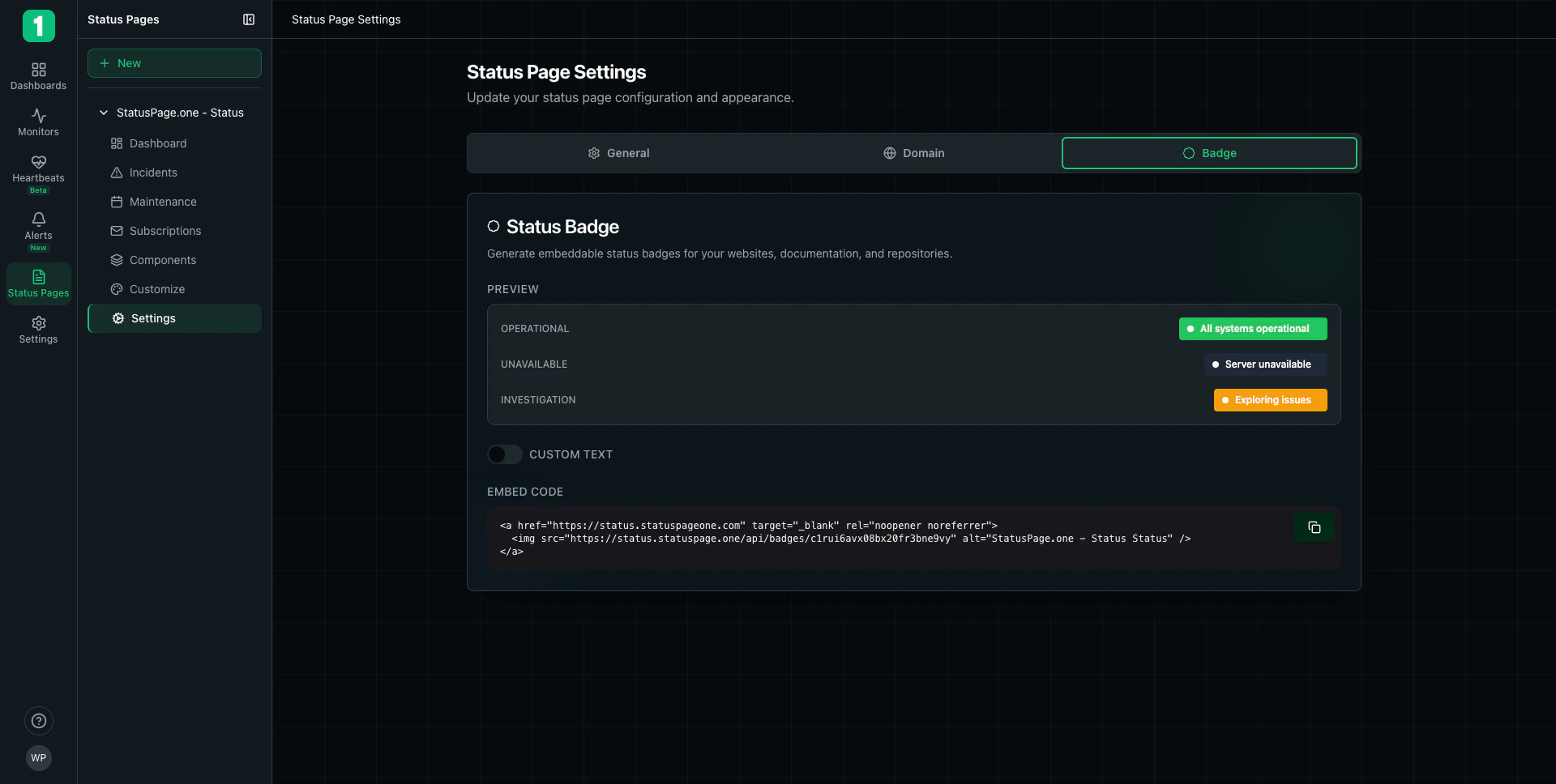
## Badge Preview
The badge settings show three preview states:
### Operational (Green)
* **Text:** "All systems operational"
* **Color:** Green background
* **Indicator:** Green dot
* **Meaning:** All monitors are passing checks
### Unavailable (Red)
* **Text:** "Server unavailable"
* **Color:** Red background
* **Indicator:** Red dot
* **Meaning:** One or more monitors are down
### Investigation (Yellow/Orange)
* **Text:** "Exploring issues"
* **Color:** Orange/Yellow background
* **Indicator:** Orange dot
* **Meaning:** System is experiencing issues under investigation
Badges update automatically based on your monitor status. You don't need to manually change them.
## Custom Text Option
You can enable custom text for your badge instead of using the default status messages:
**Toggle:** CUSTOM TEXT (on/off switch)
When enabled, you can specify:
* Custom operational message
* Custom degraded message
* Custom down message
This allows you to match your company's communication style.
## Embed Code
The **EMBED CODE** section provides ready-to-use HTML code for embedding the badge.
### HTML Embed
```html theme={null}
```
**Features:**
* Links to your status page
* Opens in new tab (`target="_blank"`)
* Includes security attributes (`rel="noopener noreferrer"`)
* Dynamic image that updates automatically
* Alt text for accessibility
**Copy Button:**
Click the copy icon (📋) to copy the embed code to your clipboard.
## Where to Use Badges
Standard placement most users expect to find
Show API or service status in your docs
Display status in your repository README
In-app status visibility
Help users check status before contacting support
Include in incident post-mortems
## Implementation Examples
### Website Footer
```html theme={null}
```
### GitHub README (Markdown)
```markdown theme={null}
## System Status
[](https://status.yourcompany.com)
Check our [status page](https://status.yourcompany.com) for real-time updates.
```
### React Component
```jsx theme={null}
export function StatusBadge() {
return (
);
}
```
### Next.js Component
```tsx theme={null}
import Image from 'next/image';
import Link from 'next/link';
export function StatusBadge() {
return (
);
}
```
## Badge Behavior
### Automatic Updates
* Badges reflect current system status in real-time
* No caching - always shows current state
* Updates within seconds of status changes
* No manual intervention required
### Click Behavior
When users click the badge:
* Opens your status page in a new tab
* Provides full incident details
* Shows historical uptime
* Allows status subscriptions
## Customization
### Badge Styles
While the badge appearance is standardized, you can customize the surrounding context:
**Wrapper Styling:**
```css theme={null}
.status-badge-link {
display: inline-block;
margin: 10px 0;
transition: opacity 0.2s;
}
.status-badge-link:hover {
opacity: 0.8;
}
```
**With Custom Text:**
```html theme={null}
Service Status:
```
## Best Practices
Users clicking the badge should go to your full status page for details, not just see a static image.
Include meaningful alt text like "System Status" or "\[YourCompany] Status" for accessibility.
Put badges where users naturally look during issues - footer, header, or documentation.
Ensure your web server or CDN doesn't cache the badge image, as it needs to update in real-time.
Verify the badge displays correctly across browsers and devices.
Add badges to API documentation so developers can quickly check service health.
## Common Placements
### Application Header
```html theme={null}
```
### Documentation Sidebar
```html theme={null}
```
## Troubleshooting
**Cause:** Browser or CDN caching.
**Solution:**
* Clear browser cache
* Ensure no caching headers on badge URL
* Check CDN settings to bypass cache for badge endpoint
**Cause:** Incorrect badge ID or URL.
**Solution:**
* Verify the embed code is copied correctly
* Check that the badge ID matches your status page
**Cause:** Missing or broken anchor tag.
**Solution:** Ensure the `` is wrapped in an `` tag linking to your status page.
## Badge vs Status Page Widget
**Status Badge:**
* ✓ Lightweight image
* ✓ Fast loading
* ✓ Simple integration
* ✗ Limited information (just current status)
* ✗ Requires click to see details
**Full Status Page:**
* ✓ Complete status information
* ✓ Historical data
* ✓ Incident details
* ✗ Requires separate page visit
* ✗ More complex to embed
Use badges for at-a-glance status, but always link to your full status page for detailed information.
## Next Steps
Use your own domain for badge links
Configure what services show on your status page
Manage incidents that affect badge status
Back to status pages overview
 ## Accessing Badge Settings
1. Navigate to **Status Pages** in the sidebar
2. Select your status page
3. Click **Settings**
4. Select the **Badge** tab
## Badge Preview
The badge settings show three preview states:
### Operational (Green)
* **Text:** "All systems operational"
* **Color:** Green background
* **Indicator:** Green dot
* **Meaning:** All monitors are passing checks
### Unavailable (Red)
* **Text:** "Server unavailable"
* **Color:** Red background
* **Indicator:** Red dot
* **Meaning:** One or more monitors are down
### Investigation (Yellow/Orange)
* **Text:** "Exploring issues"
* **Color:** Orange/Yellow background
* **Indicator:** Orange dot
* **Meaning:** System is experiencing issues under investigation
## Accessing Badge Settings
1. Navigate to **Status Pages** in the sidebar
2. Select your status page
3. Click **Settings**
4. Select the **Badge** tab
## Badge Preview
The badge settings show three preview states:
### Operational (Green)
* **Text:** "All systems operational"
* **Color:** Green background
* **Indicator:** Green dot
* **Meaning:** All monitors are passing checks
### Unavailable (Red)
* **Text:** "Server unavailable"
* **Color:** Red background
* **Indicator:** Red dot
* **Meaning:** One or more monitors are down
### Investigation (Yellow/Orange)
* **Text:** "Exploring issues"
* **Color:** Orange/Yellow background
* **Indicator:** Orange dot
* **Meaning:** System is experiencing issues under investigation